Troubleshooting a customized Autonomous Mobile Robot (AMR) or Automated Guided Vehicle (AGV) can be a complex but rewarding process. As a supplier of customized AMR/AGV robots, I’ve encountered a wide range of issues and have developed effective strategies to diagnose and resolve them. In this blog, I’ll share some key steps and insights on how to troubleshoot these advanced robotic systems. Customized AMR/AGV Robot
Understanding the Basics of AMR/AGV Systems
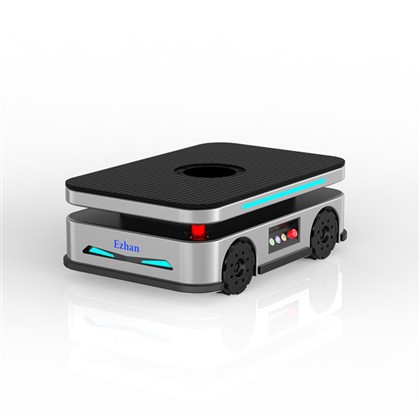
Before diving into troubleshooting, it’s essential to have a solid understanding of how AMR/AGV systems work. These robots are designed to move autonomously within a defined environment, performing tasks such as material handling, transportation, and inventory management. They rely on a combination of sensors, software, and mechanical components to navigate, avoid obstacles, and interact with their surroundings.
The main components of an AMR/AGV system include:
- Sensors: These are used to detect the robot’s position, orientation, and the presence of obstacles. Common sensors include LiDAR (Light Detection and Ranging), cameras, ultrasonic sensors, and infrared sensors.
- Navigation System: This is responsible for planning the robot’s path and guiding it to its destination. It uses algorithms and maps to calculate the optimal route and avoid collisions.
- Control System: The control system manages the robot’s movement, speed, and actions. It receives input from the sensors and navigation system and sends commands to the motors and other actuators.
- Power System: AMR/AGVs are typically powered by batteries, which need to be regularly charged to ensure continuous operation.
Common Issues and Troubleshooting Steps
1. Navigation and Localization Problems
- Symptoms: The robot may get lost, deviate from its intended path, or fail to reach its destination.
- Possible Causes:
- Incorrect map data: If the map used by the robot is outdated or inaccurate, it can lead to navigation errors.
- Sensor malfunctions: Faulty sensors can provide incorrect data, causing the robot to misjudge its position and the location of obstacles.
- Interference: External factors such as electromagnetic interference or reflective surfaces can disrupt the sensor readings.
- Troubleshooting Steps:
- Check the map data: Verify that the map is up-to-date and accurate. If necessary, update the map or re-calibrate the robot’s localization system.
- Inspect the sensors: Check for any physical damage or dirt on the sensors. Clean the sensors if necessary and test their functionality using diagnostic tools.
- Eliminate interference: Identify and remove any sources of interference in the robot’s environment. This may involve shielding the sensors or adjusting the robot’s operating parameters.
2. Communication Issues
- Symptoms: The robot may fail to communicate with the control system or other devices, resulting in a loss of control or data transfer problems.
- Possible Causes:
- Network connectivity issues: A weak or unstable network connection can prevent the robot from sending and receiving data.
- Software bugs: Errors in the robot’s software can cause communication problems.
- Hardware failures: Faulty communication modules or cables can also lead to communication issues.
- Troubleshooting Steps:
- Check the network connection: Ensure that the robot is connected to a stable network and that the network settings are correct. Try resetting the network router or access point if necessary.
- Update the software: Install the latest software updates for the robot and the control system. This can often fix known bugs and improve communication performance.
- Inspect the hardware: Check the communication modules and cables for any physical damage. Replace any faulty components if necessary.
3. Mechanical Problems
- Symptoms: The robot may experience issues with its movement, such as jerky or uneven motion, or it may fail to move at all.
- Possible Causes:
- Motor failures: Faulty motors can cause the robot to lose power or move erratically.
- Wheel or track problems: Worn or damaged wheels or tracks can affect the robot’s mobility.
- Mechanical obstructions: Objects or debris in the robot’s path can prevent it from moving freely.
- Troubleshooting Steps:
- Check the motors: Inspect the motors for any signs of damage or overheating. Test the motors using a multimeter or other diagnostic tools. Replace any faulty motors if necessary.
- Examine the wheels or tracks: Look for any signs of wear or damage on the wheels or tracks. Replace any worn or damaged components.
- Remove obstructions: Clear any objects or debris from the robot’s path. Ensure that the robot has enough clearance to move freely.
4. Battery and Power Issues
- Symptoms: The robot may have a short battery life, fail to charge properly, or experience power outages.
- Possible Causes:
- Battery degradation: Over time, the battery’s capacity may decrease, resulting in a shorter battery life.
- Charging problems: Faulty chargers or charging ports can prevent the battery from charging properly.
- Power management issues: Incorrect power settings or excessive power consumption can cause the battery to drain quickly.
- Troubleshooting Steps:
- Check the battery: Measure the battery’s voltage and capacity using a battery tester. If the battery’s capacity is significantly reduced, consider replacing it.
- Inspect the charger: Check the charger for any signs of damage or malfunction. Test the charger using a multimeter or other diagnostic tools. Replace any faulty chargers if necessary.
- Optimize power settings: Review the robot’s power management settings and adjust them as needed to reduce power consumption.
Preventive Maintenance and Best Practices
In addition to troubleshooting, preventive maintenance is crucial for ensuring the reliable operation of AMR/AGV robots. Here are some best practices to follow:
- Regular Inspections: Conduct regular inspections of the robot’s components, including the sensors, motors, wheels, and batteries. Look for any signs of wear, damage, or malfunction and address them promptly.
- Cleaning and Calibration: Keep the robot’s sensors and other components clean to ensure accurate readings. Calibrate the sensors regularly to maintain their accuracy.
- Software Updates: Install the latest software updates for the robot and the control system to fix bugs, improve performance, and add new features.
- Training and Education: Provide training to the operators and maintenance personnel on how to operate and maintain the AMR/AGV robots properly. This can help prevent issues and ensure the safe and efficient operation of the robots.
Conclusion

Troubleshooting a customized AMR/AGV robot requires a systematic approach and a good understanding of the robot’s components and systems. By following the steps outlined in this blog and implementing preventive maintenance practices, you can minimize downtime and ensure the reliable operation of your AMR/AGV robots.
Software System If you’re in the market for customized AMR/AGV robots or need assistance with troubleshooting and maintenance, we’re here to help. Our team of experts has extensive experience in designing, manufacturing, and supporting AMR/AGV systems. Contact us today to discuss your requirements and learn more about how our solutions can benefit your business.
References
- "Autonomous Mobile Robots: Technology, Applications, and Challenges" by R. Alami et al.
- "Automated Guided Vehicles: A Review of Technologies and Applications" by M. A. ElMaraghy and W. H. ElMaraghy.
- "Troubleshooting Guide for AMR/AGV Systems" by [Manufacturer’s Name].
Shenzhen Ezhan Technology Co., Ltd.
We’re known as one of the most reliable customized AMR/AGV robot manufacturers and suppliers in China. With abundant experience, we warmly welcome you to buy bulk customized customized AMR/AGV robot from our factory. If you have any enquiry about cooperation, please feel free to email us.
Address: Room 1808, 1809, 1810, Building 2, Aipark, Baolong 4th Road, Longgang District, Shenzhen City
E-mail: sales01@ezhankeji.com
WebSite: https://www.ezhanrobot.com/
